 GolfCut
How to edit a golf round video: an hour of footage down to a one-minute highlight
If you take an action cam to the course, you know how this goes. Every round leaves an hour or more of video, the shots add up to a few minutes of it, and finding them is tedious enough that the file never gets opened again. I had ten rounds sitting on a drive that way.
This guide covers the whole path: how to film so the edit is easy, how to cut a round by hand, and how I ended up automating it.
1. Film it so it can be edited
Three habits on the course decide how painful the edit will be.
- Put the camera on a tripod. Handheld footage shakes too much to use. Behind the tee, or about 45° behind the golfer, gets the whole swing in frame. See where to put the camera.
- Let it run for the whole hole. Starting and stopping for every shot is how the best shot of the day goes unrecorded. One battery will not last a round, so bring spares or a power bank.
- 2.7K or 4K at 30 fps is enough. The extra resolution pays off if you later crop to vertical video. Turn on wind noise reduction. The full list is in action-cam settings for golf.
I use a DJI Osmo Action. A GoPro works the same way, and so does a phone, as long as it sits on a tripod.
2. Why the edit never happens
The editor is not the problem. Finding the shots is. In Premiere, DaVinci Resolve or CapCut you drag through the timeline asking "was that a shot?", and half an hour is gone before you have cut anything. A round is 70 to 100 shots for each player.
Automatic editors did not help me either. The ones I tried pick highlights by voice, and they found nothing in my golf footage. In golf the moment that matters is quiet.
3. Cutting a round by hand
If you want to do it in a normal editor, this order saves the most time.
- Join the files first. Action cams split a long recording into chapters of about 4 GB. Put them on the timeline in order before you look for anything.
- Search by sound, not by picture. Expand the audio track so you can see the waveform. Impact is the shortest, sharpest spike in the recording. Jumping from spike to spike is far faster than scrubbing the video.
- Keep a few seconds either side. The setup before impact and the ball flight after it are the clip. About ten seconds per shot is plenty.
- Choose, then trim. A one-minute cut holds six to eight shots. Pick them before you polish anything.
- Finish. Slow down the second around impact, put music underneath at low volume, and export at 1080p.
It works. It also took me about thirty minutes per round just to find the shots, which is why I stopped doing it.
4. Letting software find the shots
So I wrote a program for it. GolfCut is a Windows app with three steps.

- New job. Open the folder with the day's footage. Chapters split at 4 GB are joined for you, and analysis starts right away.
- Wait. Shots are found by the impact sound together with the swing pose. Green scenes and group moments are found separately. A one-hour 4K round takes a few minutes on a laptop with a hardware video decoder. On 134 shots from real rounds it found 99% of them.
- Make highlights. One button, one mp4. Everything, or a best-of that fits 1, 3 or 5 minutes, in landscape 16:9 or portrait 9:16.
These go into the result without any extra work:
- Impact slow motion. The second either side of impact plays at 0.4×, and the sound keeps its pitch.
- Music. The built-in track or your own mp3. It ducks under shots and voices on its own.
- Title card, fades, wind-noise reduction and even volume.
- One highlight per golfer. Shots are grouped by outfit, so you only add names. Everyone in the group gets their own video.
- Send to phone. Scan a QR code and the file saves to a phone on the same Wi-Fi.
If you want to choose the clips yourself, Detailed mode shows each one: A keeps it, X drops it, and a bar trims the length. Moments it missed can be added by browsing the video.
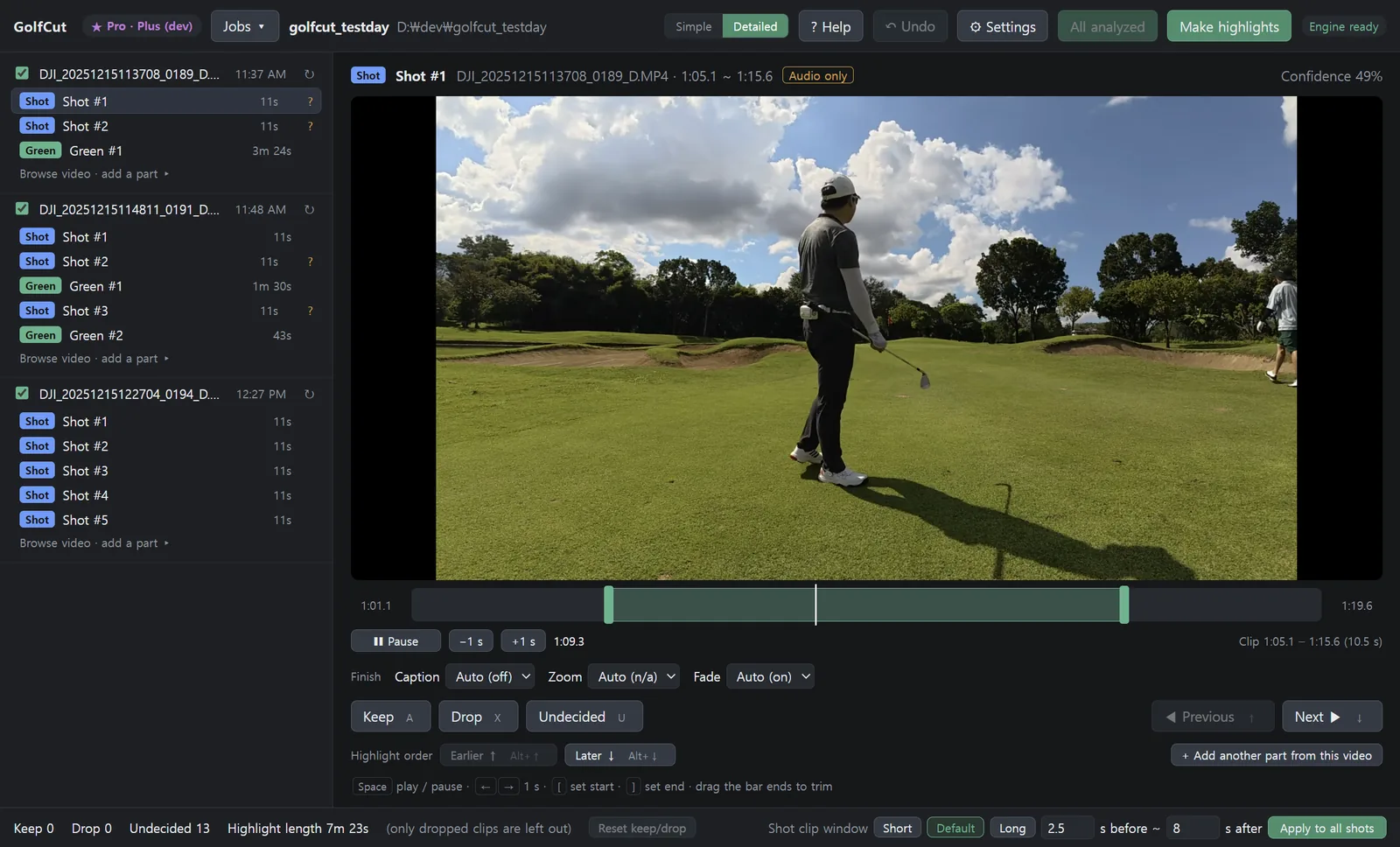
Nothing is uploaded. The video stays on your PC, so originals of tens of gigabytes go in as they are.
What it does not do
- It runs on Windows 10 and 11 only. There is no Mac version yet.
- It is built for footage from a camera on a tripod. Handheld or cart-mounted video is not what it was tuned on.
- It is not a swing analyzer and it does not draw shot-tracer lines. It makes highlights.
5. What it costs
The free edition has no time limit. Analysis, review and all the finishing work in it. Your first highlight exports at full length. After that, free exports are limited to 3 clips per recording day, at 720p with a small mark in the corner and an end card. Pro is $59 once, with no subscription.
In short
Leave the camera running on a tripod, then either hunt for the impact spikes in the waveform or let software do it. Since I started, I make the highlight the morning after a round and post it to the group chat.